Tile Map
Building a level tile by tile with manual drawing calls would get unmanageable fast; TileMap takes a tileset and a layout, and handles the rest.
Overview
TileMap is contained in the header "remake2d/tilemap.hpp". A tile layout is described by a flat array of IDs, applied over a grid whose dimensions and tileset clipping are described by a TileMapData structure:
struct TileMapData {
    Vec2d  center;
    Dim2d  size;
    Grid2d cut;
    Dim2d  clip_size;
    Vec2d  clip_start;
    Vec2d  margin;
};

// TileMapData constructor
TileMapData (void);
TileMapData (Vec2d center, Dim2d size, Grid2d cut, Dim2d clip_size, Vec2d clip_start = 0, Vec2d margin = 0);
center: the map's center position.size: the map's total rendered size.cut: number of columns and rows of the map.clip_size: size of a single tile in the tileset image.clip_start: top-left position of the first tile in the tileset image.margin: spacing between tiles in the tileset image.
Methods
using TileID       = u32;
using TileTemplate = std::vector<u32>;

Dim2d  clip(void)        const noexcept; // get tile clip size
Dim2d  size(void)        const noexcept; // get map size
Vec2d  center(void)      const noexcept; // get map position
Grid2d cut(void)         const noexcept; // get grid dimensions
TileMapData data(void)   const noexcept; // get all grid data

u32    tileCount(void)   const noexcept; // total number of tiles
u32    tileCount(TileID) const noexcept; // count of a specific tile type

void move(Vec2d)        noexcept;   // move map
void resize(Dim2d)      noexcept;   // resize map
void counterStart(i16)  noexcept;   // set starting tile ID offset
void tag(std::string_view, TileID); // assign a tag to a tile ID

void load(TileTemplate);   // load tile layout
void build(void) noexcept; // build physics for tagged tiles (async)

void applyPhysic(TileID);
void applyPhysic(std::string_view);

PhysicBody& body(TileID);
PhysicBody& body(std::string_view);
Usage
Creating a map
The constructor takes the tileset path and a TileMapData structure describing its geometry:
rmk::TileMapData data (
    {400, 300},    // center
    {800, 600},    // size
    {10, 8},       // cut
    {32, 32}       // clip size
);

rmk::TileMap map("tileset.png", data);
Loading a layout
With the geometry in place, all that's left is describing which tile goes where; load expects a flat array whose length equals cut.x * cut.y:
rmk::TileMap::TileTemplate layout = {
    0, 0, 1, 0, 0, 0, 0, 0, 0, 0,
    0, 1, 1, 1, 0, 0, 0, 0, 0, 0,
    2, 2, 2, 2, 2, 2, 2, 2, 2, 2,
    // ... 5 more rows
};

map.load(layout);
Drawing a map
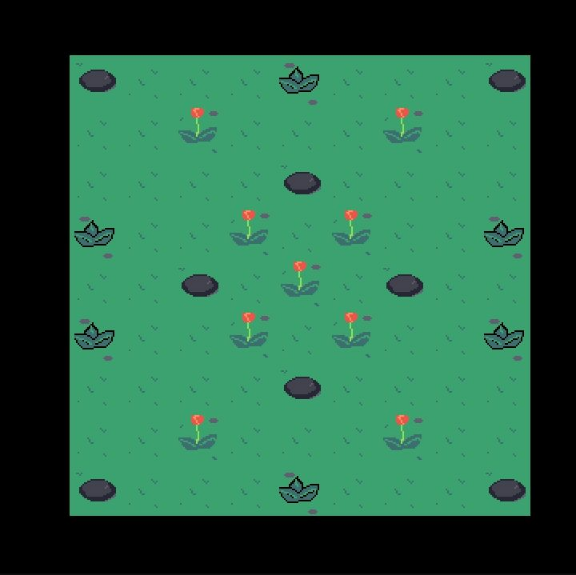
To display a TileMap, we will use the fill method of Window. We will use an example created with Pixel Studio, downloadable here, to test it ourselves.

#include <remake2d/all/graphics.hpp>
#include <remake2d/tilemap.hpp>
#include <remake2d/stream.hpp>
#include <remake2d/loop.hpp>

int main (void) {

    rmk::Window win;
    auto path = "tilemap.png";

    rmk::TileMapData data(
        win.center(),   // center
        {576, 576},     // size
        {9, 9},         // cut
        {32, 32}        // clip_size
    );

    rmk::TileMap map(path, data);

    map.counterStart(0);

    map.load({
        1, 0, 0, 0, 2, 0, 0, 0, 1,
        0, 0, 3, 0, 0, 0, 3, 0, 0,
        0, 0, 0, 0, 1, 0, 0, 0, 0,
        2, 0, 0, 3, 0, 3, 0, 0, 2,
        0, 0, 1, 0, 3, 0, 1, 0, 0,
        2, 0, 0, 3, 0, 3, 0, 0, 2,
        0, 0, 0, 0, 1, 0, 0, 0, 0,
        0, 0, 3, 0, 0, 0, 3, 0, 0,
        1, 0, 0, 0, 2, 0, 0, 0, 1
    });
    map.build();

    rmk::loop.execute(win, [&] () {
        win.fill(map);
    });

    rmk::loop.update();
}
Tags
Hardcoding numeric IDs everywhere in the code gets unreadable fast; a tag gives a type of tile a proper name:
Physics on tiles
A wall or a rock drawn in the tileset doesn't block anything until it has a physics body; applyPhysic turns a given tile type into a real physics entity, creating a StaticBody for every tile of that type.
Applying physics to a tile type
map.tag("rock", 1);
map.applyPhysic("rock"); // also works with map.applyPhysic(1)

map.build(); // builds physics for every tile of that type, asynchronously
Build must be called after applyPhysic, and before relying on the resulting bodies; it runs the underlying work asynchronously so it doesn't block the frame it's called on.
Using the resulting body
Once built, every tile matching that ID becomes a solid StaticBody automatically placed and moved with the map; body gives a reference to it, configurable exactly like a body created by hand, tags and contact callbacks included:
rmk::PhysicBody& rock = map.body("rock");

rock.isSolid(true);
rock.onContactStart.join([] (rmk::Tracker<rmk::PhysicBody> self, rmk::Tracker<rmk::PhysicBody> other) {
    if (other->tag() == "player") std::cout << "player touched a " << self->tag() << std::endl;
});
This physical body is copied between each instance of the same ID, so any modification made to it must happen before the call to build.
Counter start
External map editors often reserve ID 0 for "empty tile"; counterStart shifts where the map's own IDs start counting from, to stay consistent with the imported tileset:
Following and Culling
Since version v0.3 of the engine, each Window automatically performs culling on each object drawn on it, which removes the direct dependency of TileMap on the Camera for optimization; Therefore, it is recommended not to perform culling manually, to avoid duplicating logic ;)
Property
| Type | Copiable | Movable | Bases and Traits |
|---|---|---|---|
| TileMap | No | Yes | Printable |
| TileMapData | Yes | Yes | None |